Network in AWS
Cloud networks form the backbone of distributed systems infrastructure. AWS is the canonical reference: understanding its networking model gives you the vocabulary and mental model for every other cloud provider — they’re broadly similar with different names.
This lesson is a tour of the AWS networking primitives, from the top-level account hierarchy down to security groups and route tables.
The Hierarchy
Why multi-account?
Common reasons organizations split into multiple accounts:
- Separation of applications — different security needs, regulatory requirements, or operational teams.
- Tenant separation — strict isolation between customers in multi-tenant systems (large enterprise tenants often get their own AWS account).
- Environment isolation — dev/staging/prod can’t accidentally touch each other.
- Cost allocation — clean per-business-unit billing.
- Compliance — regulations sometimes require strict isolation.
VPC: Virtual Private Cloud
A VPC is your isolated network environment within AWS — virtually equivalent to a private data center. Resources inside communicate via private IPs, logically separated from other AWS customers.
CIDR blocks
When you create a VPC, you pick a CIDR block that defines the available IP range — e.g., 10.0.0.0/16 gives you 65,536 addresses (10.0.0.0 to 10.0.255.255). All subnets inside the VPC use slices of this space.
Properties
Subnets
Subnets are subdivisions of a VPC. Each subnet:
- Lives in exactly one AZ.
- Uses a subset of the VPC’s CIDR block.
- Can be public (internet-accessible) or private (internal-only).
Why multiple subnets
- High availability — spread resources across subnets in different AZs.
- Security segmentation — public web servers vs. private databases.
- Access control — public subnets connect to the internet; private subnets stay isolated.
- Compliance — different tiers may need different security controls.
A typical 3-tier deployment uses six subnets — public + private in three AZs:
VPC: 10.0.0.0/16

  AZ us-east-1a:                AZ us-east-1b:                AZ us-east-1c:
   ├── public-1a (10.0.1.0/24)   ├── public-1b (10.0.2.0/24)   ├── public-1c (10.0.3.0/24)
   └── private-1a (10.0.11.0/24) └── private-1b (10.0.12.0/24) └── private-1c (10.0.13.0/24)
Internet Connectivity
Internet Gateway (IGW)
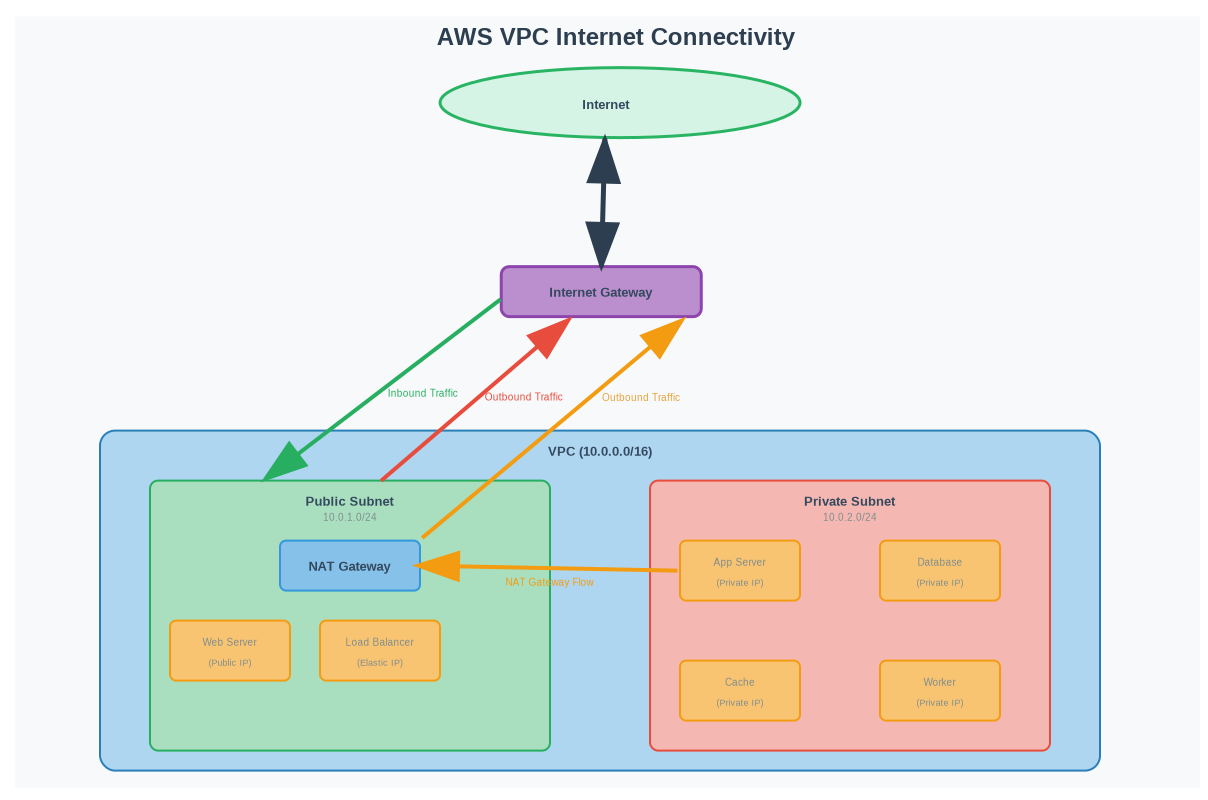
Provides bidirectional internet connectivity for public subnets. One per VPC. Resources in public subnets with public IPs (or Elastic IPs) are reachable from the internet.
NAT Gateway / NAT Instance
Lets resources in private subnets access the internet (for software updates, calling external APIs) without being reachable from outside.
Route Tables
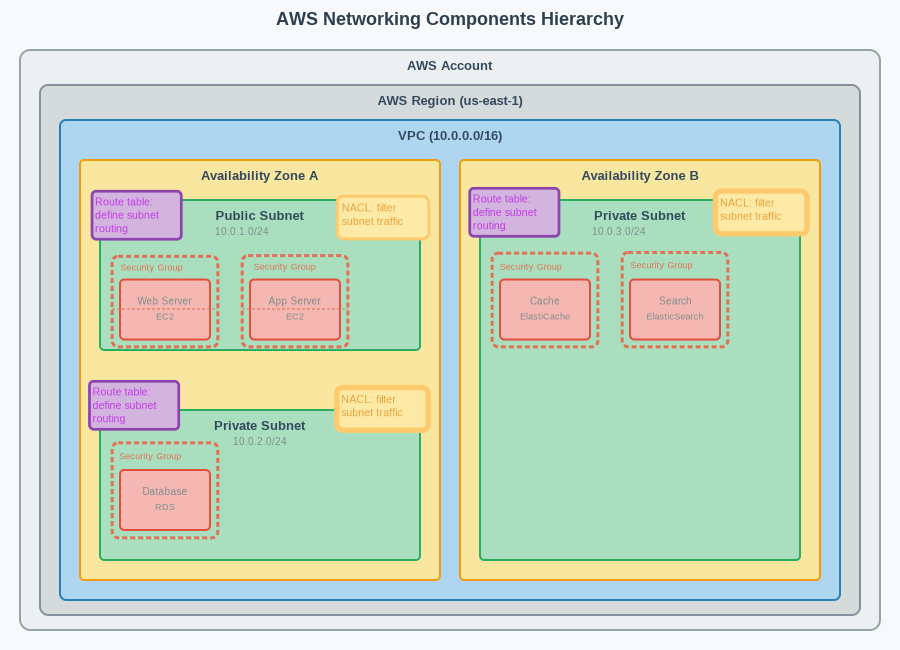
A route table specifies where traffic from a subnet goes. Each subnet associates with exactly one route table. Common entries:
| Destination | Target | Meaning |
|---|---|---|
| VPC CIDR (e.g., 10.0.0.0/16) | local | Within-VPC traffic stays internal |
| 0.0.0.0/0 | igw-xxx | Send everything else to internet (public subnet) |
| 0.0.0.0/0 | nat-xxx | Send everything else to NAT (private subnet) |
| 192.168.0.0/16 | pcx-xxx | Send to peered VPC |
Security: Two Layers
AWS gives you two complementary mechanisms for traffic control.
Security group example
Allow SSH from one IP, HTTP/HTTPS from anywhere:
| Type | Protocol | Port range | Source | Description |
|---|---|---|---|---|
| SSH | TCP | 22 | 117.212.92.68/32 | Office IP |
| HTTP | TCP | 80 | 0.0.0.0/0 | Public web |
| HTTPS | TCP | 443 | 0.0.0.0/0 | Public web |
Most production setups use security groups heavily and NACLs sparingly (default-allow NACLs as a safety net rather than primary control).
The order a packet is judged
Route tables, NACLs, and security groups are stacked, not interchangeable.
- The subnet route table only picks a next hop. It never accepts or denies.
- The NACL on that subnet filters next. Rules run in rule-number order, first match wins, and a final catch-all denies the rest. Because the list is stateless, return packets need their own allow entry.
- The security group on the elastic network interface is last, at the instance rather than the subnet.
Drop a bad source range on the NACL when the packet should die at the subnet boundary. Restrict a database to the application security group when the decision is which interface may connect.
Each account starts with one default VPC per region and can add more, up to five additional VPCs per region before a quota increase. EC2, RDS, VPCs, and S3 buckets are regional. IAM, Route 53, and CloudFront are global.
Connecting VPCs and Networks
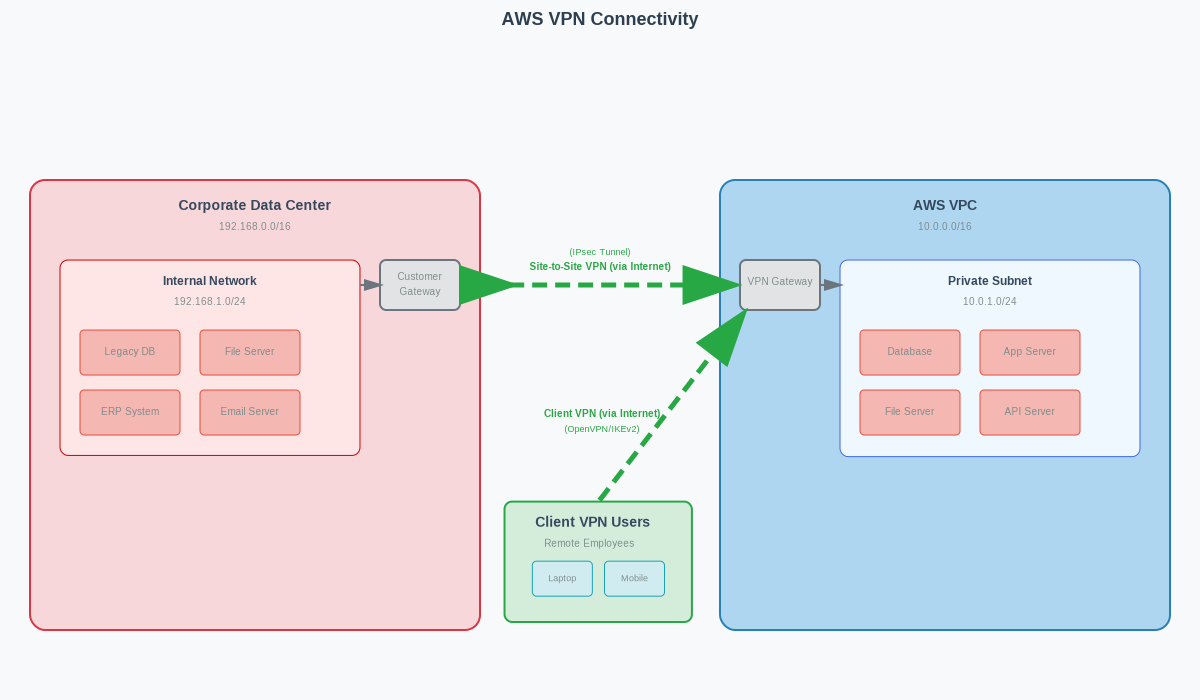
Client VPN is Site-to-Site for one device. The office network uses a Site-to-Site IPsec tunnel; a laptop uses Client VPN to reach private addresses that must stay off the public internet. Both land in the VPC route tables and security groups.
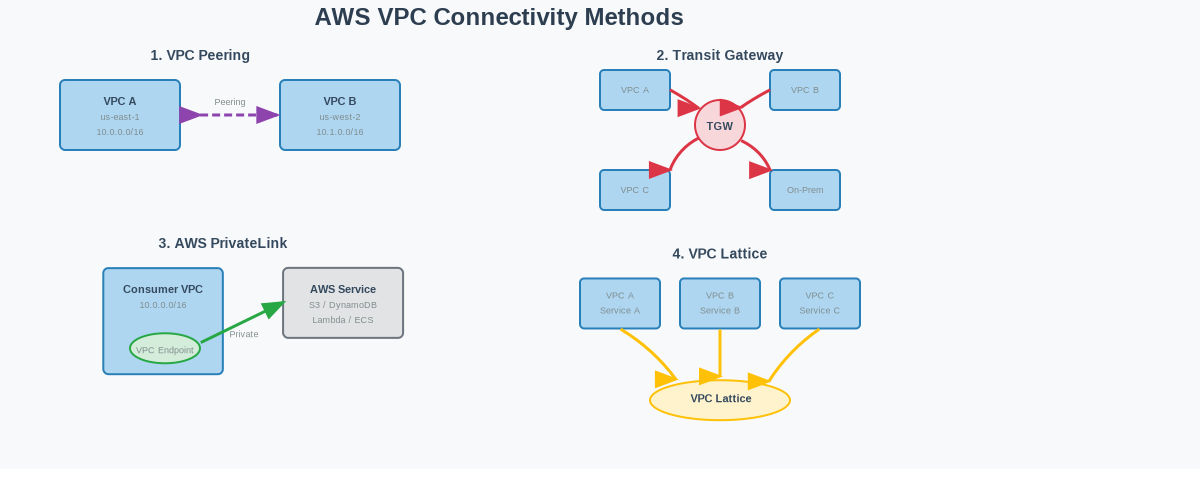
VPC Lattice connects services rather than CIDRs. Peering and Transit Gateway join networks. Lattice adds discovery, load balancing, and an access policy across VPCs and accounts while the IP spaces stay separate.
| Service | What it adds outside the VPC |
|---|---|
| Route 53 | Geolocation, weighted records, health-checked failover, and private DNS that resolves only inside the VPC |
| CloudFront | Edge cache, TLS at the PoP, and a shorter path for dynamic requests that still reach the origin |
| Global Accelerator | An anycast entry that moves packets onto the AWS backbone at the nearest edge |
| Gateway Load Balancer | A Layer 3 insert for third-party firewalls and intrusion-detection appliances |
| API Gateway | REST, HTTP, and WebSocket front doors. HTTP APIs are the narrower, cheaper option |
A Realistic Topology
A typical multi-tier production VPC for a SaaS platform:
                                     Internet
                                         │
                                    [Internet GW]
                                         │
          ┌──────────────────────────────────────────────────────────┐
          │  VPC: 10.0.0.0/16                                        │
          │                                                          │
          │  ┌─Public Subnets────────────────────────────────┐       │
          │  │  ALB / NAT GW (one per AZ)                    │       │
          │  └─┬───────────────┬───────────────┬─────────────┘       │
          │    │               │               │                     │
          │  ┌─▼────────────┐ ┌▼────────────┐ ┌▼────────────┐        │
          │  │ App Subnet   │ │ App Subnet  │ │ App Subnet  │        │
          │  │ (private)    │ │ (private)   │ │ (private)   │        │
          │  │ ECS / EKS    │ │ ECS / EKS   │ │ ECS / EKS   │        │
          │  └─┬────────────┘ └┬────────────┘ └┬────────────┘        │
          │    │               │               │                     │
          │  ┌─▼────────────┐ ┌▼────────────┐ ┌▼────────────┐        │
          │  │ DB Subnet    │ │ DB Subnet   │ │ DB Subnet   │        │
          │  │ (isolated)   │ │ (isolated)  │ │ (isolated)  │        │
          │  │ RDS Multi-AZ │ │             │ │             │        │
          │  └──────────────┘ └─────────────┘ └─────────────┘        │
          │     AZ 1a            AZ 1b            AZ 1c              │
          └──────────────────────────────────────────────────────────┘
This shape — public subnets for load balancers and NAT, private subnets for app, isolated subnets for data — is the AWS reference architecture. Other clouds use the same shape with different names.
Multi-region for SaaS
Multi-region deployments serve three needs in SaaS:
- Latency — users get a region close to them.
- Compliance — EU customers’ data stays in EU regions; US in US.
- Disaster recovery — region-level failures don’t take everyone down.
Standard patterns:
- Active-passive — primary region serves all traffic; secondary stays warm and takes over on failure.
- Active-active — both regions serve traffic; clients route to closest. Higher cost; harder consistency story.
- Region-per-tenant — each tenant deployed to one region based on their compliance/latency needs. Common in B2B SaaS.
Recap
- Account → Region → AZ → VPC → Subnet is the core hierarchy.
- VPCs give you isolated networks; subnets give you AZ placement and segmentation.
- Internet Gateway + Route Tables for public connectivity; NAT Gateway for outbound from private subnets.
- Security Groups (stateful, instance) + NACLs (stateless, subnet) layer defense.
- Multi-VPC connectivity: peering for simple cases, Transit Gateway for scale, Direct Connect / VPN for hybrid.
- Multi-region patterns serve latency, compliance, and DR — common in SaaS at scale.